Deployment Architecture
Apache Ozone is a distributed, scalable object store designed for modern data workloads. It follows a separation of metadata and data services architecture that enables independent scaling and operational flexibility. This document outlines the recommended deployment architecture for production Ozone clusters.
Core Architectural Principles
Ozone's design is built on several key principles that influence deployment architecture:
-
Separation of Metadata and Data Services: Metadata operations (managed by OM and SCM) are separated from data storage operations (handled by Datanodes).
-
Strong Consistency: All metadata operations use consensus protocols (Ratis) to provide strong consistency guarantees.
-
Independent Scaling: Control plane (OM, SCM) and data plane (Datanodes) can scale independently based on different workload demands.
-
Resilient Storage: Data is protected through replication or erasure coding across datanodes.
-
High Availability: All critical services can be deployed in HA configurations.
Component Architecture Overview
Ozone deployment consists of several core components, each with distinct roles in the overall architecture:
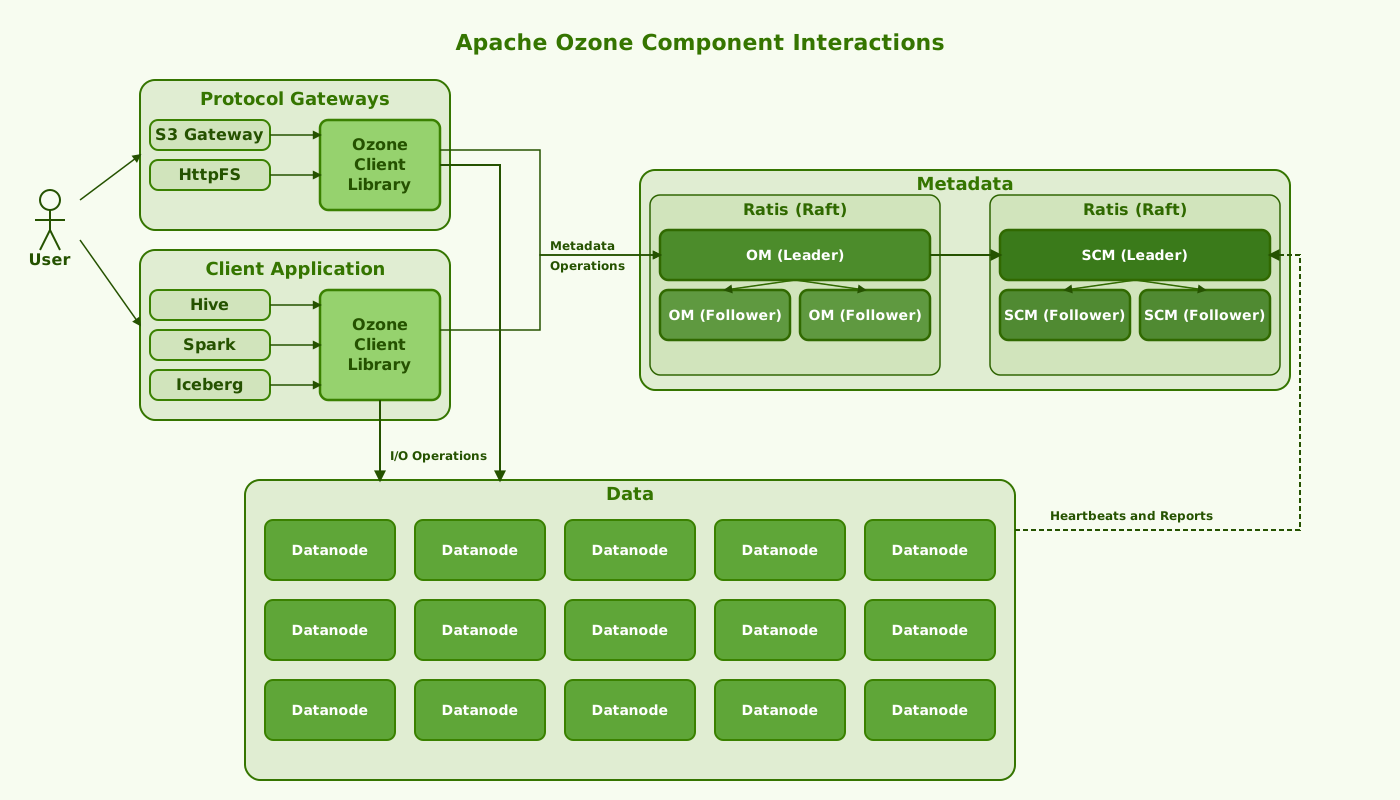
Metadata Service Components
1. Ozone Manager (OM)
The Ozone Manager handles namespace operations (volumes, buckets, keys) and manages metadata in RocksDB.
-
Primary Responsibilities:
- Managing the namespace hierarchy (volumes, buckets, keys)
- Handling access control and security
- Allocating blocks for data storage
- Tracking key locations
- Processing client requests for metadata operations
-
Deployment Pattern:
- 3-node HA deployment using Ratis consensus protocol (minimum recommendation for production)
- Single node for development/testing environments
2. Storage Container Manager (SCM)
The SCM orchestrates container lifecycle and coordinates datanodes.
-
Primary Responsibilities:
- Managing datanodes and their health
- Orchestrating container creation and placement
- Managing write pipelines
- Coordinating container replication and erasure coding
- Handling block management
-
Deployment Pattern:
- 3-node HA deployment using Ratis consensus protocol (minimum recommendation for production)
- Single node for development/testing environments
Data Service Components
3. Datanodes
Datanodes store the actual data in containers on local disks.
-
Primary Responsibilities:
- Storing container data on local disks
- Serving read and write requests from clients
- Participating in data replication pipelines
- Reporting container status to SCM
- Managing local data integrity
-
Deployment Pattern:
- Horizontal scaling from few to thousands of nodes
- Distributed across racks for fault tolerance
- Rack awareness enabled for topology-aware placement
Optional Service Components
4. Recon
Recon provides analytics and monitoring for the cluster.
-
Primary Responsibilities:
- Collecting and aggregating metrics from OM, SCM, and Datanodes
- Providing a web UI for monitoring
- Offering insights into cluster health and performance
- Tracking resource utilization and anomalies
-
Deployment Pattern:
- Single node deployment is typically sufficient
- Can be deployed alongside other components on smaller clusters
5. S3 Gateway
S3 Gateway provides S3-compatible API access.
-
Primary Responsibilities:
- Translating S3 API requests to Ozone operations
- Managing authentication and authorization for S3 clients
- Supporting S3 multipart uploads
- Handling S3-specific features and compatibility
-
Deployment Pattern:
- Deploy on each Datanode for distributed access
- Alternatively, deploy on dedicated gateway nodes
- Use a load balancer to distribute client requests
Consolidated vs. Dedicated Node Deployments
Ozone supports both consolidated and dedicated node deployment patterns, depending on cluster size and resource availability.
Small to Medium Clusters (Up to ~50 Datanodes)
For smaller clusters, consolidation of services can be efficient:
-
Consolidated Metadata Nodes:
- OM and SCM can be co-located on the same three physical nodes
- Each machine runs both OM and SCM processes
- Requires more powerful machines (32+ cores, 64GB+ RAM, multiple SSDs)
- Example: 3 physical servers each running both OM and SCM instances

-
Datanodes with Co-located Services:
- S3 Gateway on all or select Datanodes
- Load balancer distributing S3 traffic
Large Clusters (50+ Datanodes)
For larger production environments, dedicated nodes are recommended:
-
Dedicated Metadata Nodes:
- 3 nodes running only OM instances
- 3 nodes running only SCM instances
- Separate dedicated node for Recon

-
Dedicated Gateway Nodes:
- Separate nodes for S3 Gateway (and potentially HttpFS)
- Load balancers in front of gateway services
- Example: 3+ dedicated S3 Gateway nodes behind a load balancer
-
Pure Datanodes:
- Datanodes running only datanode services
- Optimized for storage and data throughput
Network Design Considerations
Network architecture significantly impacts Ozone performance and reliability:
-
Network Topology:
- All nodes must be reachable from each other
- Metadata services should have low-latency connectivity to each other (ideally same rack)
- Clients typically connect to S3 Gateway or directly to OMs
-
Network Requirements:
-
Metadata Service Traffic:
- OM-OM Ratis: Port 9872
- SCM-SCM Ratis: Port 9891
- Ensure low latency between metadata nodes for consensus
-
Client-to-Service Traffic:
- Client to OM (RPC): Port 9862
- Client to SCM (RPC): Port 9860
- Client to S3 Gateway: Port 9878 (HTTP) or 9879 (HTTPS)
-
Inter-Service Traffic:
- OM to SCM communication
- Datanode to SCM registration and heartbeats
- Client to Datanode data transfers
-
-
Bandwidth Recommendations:
- Metadata nodes: 10GbE or better
- Datanodes: 10GbE minimum, 25/40/100GbE for high-throughput workloads
- Consider network oversubscription ratios in rack design
Topology Awareness
Ozone can be deployed with awareness of the physical infrastructure topology, which improves performance and reliability:
-
Rack Awareness:
- Configurable via the
net.topology.node.switch.mapping.implproperty - Ensures data is distributed across failure domains
- Improves read performance through locality
- Essential for proper erasure coding placement
- Configurable via the
-
Configuration Example:
<property>
  <name>net.topology.node.switch.mapping.impl</name>
  <value>org.apache.hadoop.net.ScriptBasedMapping</value>
</property>
<property>
  <name>net.topology.script.file.name</name>
  <value>/etc/hadoop/conf/topology.script</value>
</property>
- Standard Topology Format:
- Typically
/rack/hostnameor/datacenter/rack/hostname - More detailed topologies supported for complex deployments
- Typically
Deployment Examples
Example 1: Consolidated 6-Node Production Cluster
A minimal production deployment with consolidated services:

Key Characteristics:
- OM and SCM services co-located on the same physical nodes
- S3 Gateway running on each datanode
- Single Recon instance for monitoring
- Minimum viable configuration for full HA deployment
Example 2: Large-Scale Production Cluster
A larger deployment with dedicated service nodes:

Key Characteristics:
- Dedicated nodes for each service type
- Separate S3 Gateway nodes behind a load balancer
- Multiple racks of datanodes
- Optimized for large-scale production deployments
Load Balancer Configuration
For production deployments with S3 Gateway services, a load balancer is essential:
- S3 Gateway Load Balancing:
- Deploy a load balancer (e.g., HAProxy, NGINX, hardware-based) in front of S3 Gateway instances
- Configure health checks to monitor gateway availability
- Example simple NGINX configuration:
upstream ozone_s3_backend {
    server datanode1.example.com:9878;
    server datanode2.example.com:9878;
    server datanode3.example.com:9878;
    # Add more S3 Gateway instances as needed
}

server {
    listen 80;
    server_name s3.ozone.example.com;

    location / {
        proxy_pass http://ozone_s3_backend;
        proxy_set_header Host $host;
        proxy_set_header X-Real-IP $remote_addr;
        proxy_set_header X-Forwarded-For $proxy_add_x_forwarded_for;
        proxy_set_header X-Forwarded-Proto $scheme;
    }
}
- OM Load Balancing (for client HA):
- Clients can directly use the OM HA service ID
- For advanced scenarios, a load balancer can distribute initial client connections
Multi-Datacenter Deployments
For geographically distributed deployments, consider these approaches:
-
Active-Passive Configuration:
- Primary datacenter runs all Ozone services
- Secondary datacenter can host DR backup
- Asynchronous replication between sites (not built-in, requires additional tooling)
-
Independent Clusters with Cross-Replication:
- Separate Ozone clusters in each datacenter
- Data synchronization using external tools or application-level replication
- Clients connect to local datacenter resources
-
Extended Topology Awareness:
- Configure Ozone with datacenter-aware topology
- Ensure proper container placement across sites
- Note: While technically possible, cross-datacenter consensus has higher latency impact
Security Considerations
When planning deployment architecture, consider security requirements:
-
Kerberos Integration:
- Requires KDC (Kerberos Key Distribution Center) accessible to all nodes
- Configure secure communication between all components
-
TLS Encryption:
- Configure certificates for all services
- Plan for certificate renewal and management
-
Authorization:
- Ranger integration for fine-grained access control
- Knox integration for perimeter security and single sign-on
Summary of Deployment Recommendations
-
Metadata Services:
- Deploy OM and SCM in 3-node HA configurations
- For smaller clusters, consolidate OM and SCM on the same nodes
- For larger clusters, use dedicated nodes for each service
-
Datanodes:
- Scale horizontally based on capacity and performance needs
- S3 Gateway can be co-located with datanodes or deployed separately
-
Network Configuration:
- Ensure low latency between metadata nodes
- Configure proper security and firewall rules
-
Load Balancing:
- Use load balancers for S3 Gateway services
- Configure health checks and failover
By following these deployment architecture recommendations, you can build a robust, high-performance Ozone cluster that meets your production requirements for durability, performance, and availability.